Parsing a one-off screening response
This document outlines a sample request and response, and how it can be parsed tosurface the most relevant information to the end-user of a screening system. Every one-off screening endpoint returns the same response format. In each screening request, you can specify the details of one entity, and the response will contain the risks and KYC details of multiple individual entities, each of which is a candidate match result for your search. The number of results and type of indicators, news, or KYC data returned all depend on your filterset. When you use the simple-screening endpoint, you are using a simplified, built-in filterset of your choice.
Assume that you are onboarding a new client, Gazprom, and you want to perform a risk screen. You have already created a filterset that matches your organization's
risk policies, with example filterset ID 1.
You perform the following request against a one-off screening endpoint:
{
    "entityName": "Gazprom",
    "filterSetID": 1
}
Response Format
Your response will list both the total number of entities that matched your search and policy (resultCount) and a list of results (resultRows) in a top-level object.
Each result row is a separate natural or legal entity, with its own independent risks and KYC data. Two fields inside of each result row are specific to your search:
matchName, which lists which of the entity's aliases most closely matched your search term, and matchStrength, which provides a similarity estimate for your original
search term from 0 to 1. Results are ordered first by match strength, then by score. Many fields have a sourceAttribution property, that may be safely ignored.
If your resultCount is zero, then no risks met your policy's risk threshold, and there are no risks to display.
Depending on your organization's policies, you may treat this as an 'Auto-Clear' or 'Auto-Approve' scenario.
{
    "resultCount": 19,
    "resultRows": [
        {
            "matchName": "PUBLIC JOINT STOCK COMPANY GAZPROM",
            "matchStrength": 0.99,
            "entity": { ... }
        },
        {
            "matchName": "Gazmash, Ao",
            "matchStrength": 0.85,
            "entity": { ... }
        }
    ]
}
Entity Information
The entity object contains the following properties that describe KYC and risk information. Note that the response contains many other fields and properties,
but not all are useful inside of a KYC or risk screening context.
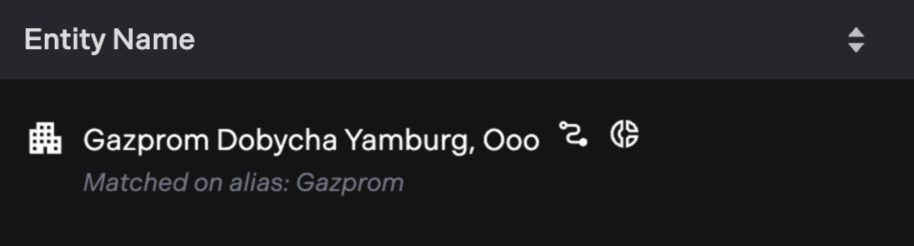
entityName- The canonical name of the entity. You should display this name as the name of the result. On the Sigma360 platform, we display both the entity name and match name, if they differ:
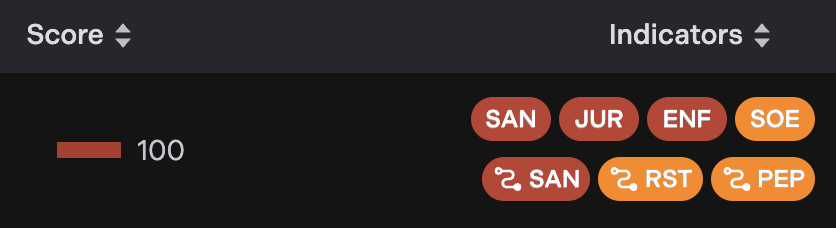
riskSummaryandindicatorSummaries- These fields show a summary of the risks in the indicators object. It is provided for convenience. The
riskSummaryobject shows the entity's overall risk score, which is computed using the Sigma360 Risk Scoring Model. TheindicatorSummariesobject shows a count of each detected indicator category, and the score of the riskiest indicator in the category. The Sigma360 platform displays these datapoints like this:
- These fields show a summary of the risks in the indicators object. It is provided for convenience. The
news- Negative News / Adverse Media events and articles. Described in detail here.
indicators- Detected risks. These may be watchlist hits, risky corporate histories, or AML risks detected through a statistical model. Described in detail here.
KYC- Corporate or biographical information. This should be used to confirm that the entity in question is a match to your customer. Described in detail here.
Risks: Indicators and News
Indicators and News represent real-world risks for an analyst to review. Each risk should be presented individually to a user.
Indicators
Indicators represent risks attached to an entity. When displaying indicators on an entity, we recommend giving the most attention to the category, name, and description fields.
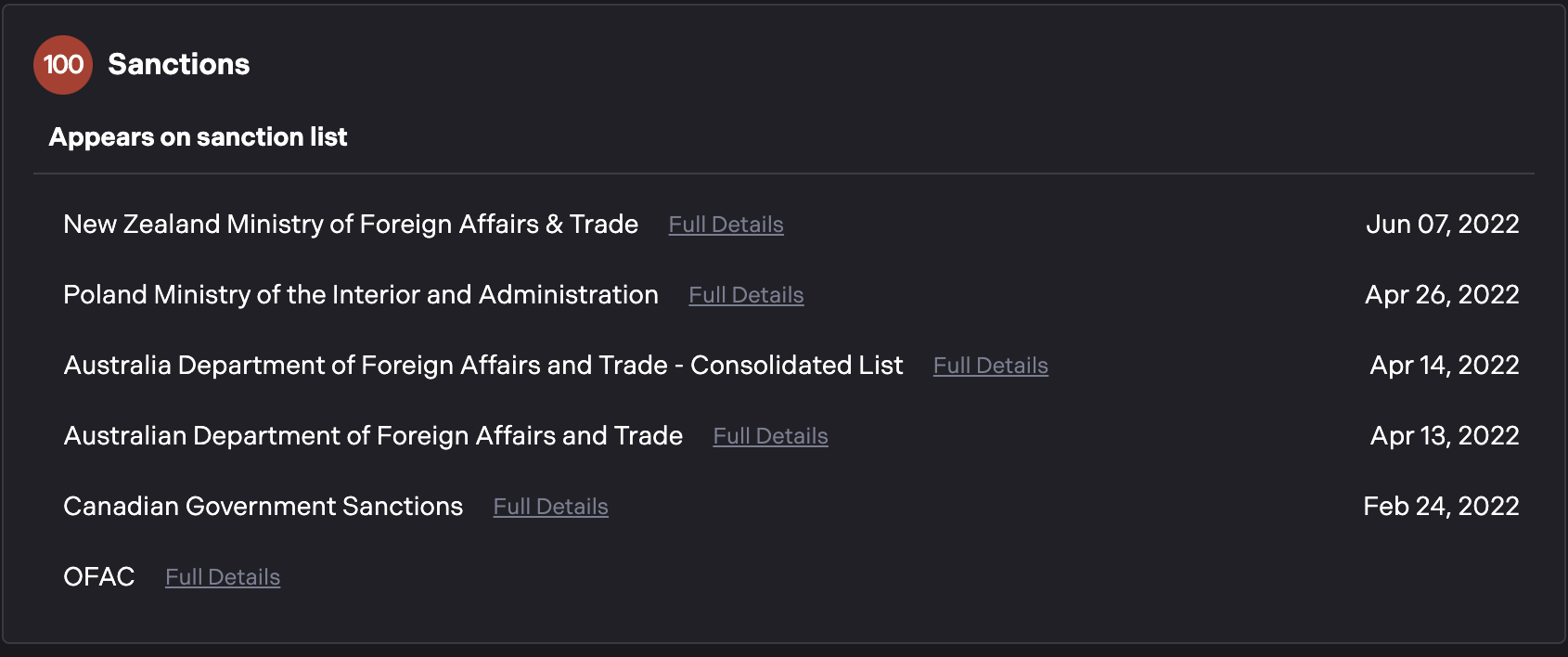
These fields provide clear, user-readable context about the risk. For example, when displaying sanctions in the Sigma360 platform, we group indicators by Category ("Sanctions"),
Name ("Appears on sanction list"), and then show the description ("OFAC", or "Australian Department of Foreign Affairs and Trade"):
The indicator object contains these fields:
category- Human readable. Should always be displayed on the indicator.
name- Human readable. Should always be displayed on the indicator.
description- Human readable. Should always be displayed on the indicator.
subcategory- Not human readable. May contain a value such as
sanctions_us_ofac.
- Not human readable. May contain a value such as
hopsAway- Determines whether or not the indicator describes a direct risk on this entity, or a transitive risk to another connected entity. See also:
causalSigmaIDand the Network Indicators section.
- Determines whether or not the indicator describes a direct risk on this entity, or a transitive risk to another connected entity. See also:
You should clearly distinguish indicators that have 0 hopsAway (direct risks) and that have non-zero hopsAway (transitive or "network" risks).
For network risks, you should show that the risk is connected to another entity, that is in turn connected to your entity. See Network Indicators
code- Not human readable. These are Sigma360-specific codes that align with our data ontology. A full inventory of codes is available upon request.
urn- A unique identifier / primary key for this risk. It is guaranteed to be unique to a risk, such as a specific entry on a watchlist, or person in a PEP database.
score- A risk score, from 0-100. This is derived from the Sigma360 Risk Scoring model.
extras- A list human-readable key-values. The keys are strings, and the values are string arrays. There are no fixed keys, all keys and values should be shown to the user. The Sigma360 platform puts the extras "under-the-fold", revealed by a user click.
causalSigmaID- On network risk indicators (
hopsAway> 0), acausalSigmaIDwill be present, with an abbreviated entity object. This entity object describes not your root entity, but an entity connected to it by some association, and which carries the named risk directly. Only present whenhopsAway> 0. See Network Indicators.
- On network risk indicators (
See a full JSON indicators example
"indicators": [
{
    "category": "Sanctions",
    "subcategory": "sanctions_us_ofac",
    "name": "Appears on sanction list",
    "description": "OFAC",
    "code": "SAN008",
    "urn": "urn:sigma:indicator:Kk_tnC9lQwYe6C9amZEOgCs4C7AjhkrLFQO14onyHJc=",
    "sourceAttribution": [
        "1234_sourcenumber_nothumanreadable"
    ],
    "hopsAway": 0,
    "sources": [
{
    "name": "17250",
    "url": "https://sanctionssearch.ofac.treas.gov/Details.aspx?id=17250"
}
    ],
    "score": 100,
    "date": null,
    "primaryExtras": {
    "Programs": [
    "UKRAINE-EO13662",
    "RUSSIA-EO14024"
    ],
    "SDN Status": [
    "Non-SDN"
    ]
},
    "extras": {
    "Entity Number": [
    "17250"
    ],
    "Programs": [
    "UKRAINE-EO13662, RUSSIA-EO14024"
    ],
    "Remarks": [
    "For more information on directives, please visit the following link: http://www.treasury.gov/resource-center/sanctions/Programs/Pages/ukraine.aspx#directives."
    ],
    "SDN Status": [
    "Non-SDN"
    ]
},
    "originatingSigmaID": "DDY7GVVGDMHZ4"
},
{
    "code": "SAN010",
    "name": "Appears on sanction list",
    "category": "Sanctions",
    "subcategory": "sanctions_other_current",
    "urn": "urn:sigma:indicator:XMqUQd4_rzQay5YCptzmywEOdTjglrWxrGFCXOkoEgk=",
    "sourceAttribution": [
    "1234_sourcenumber_nothumanreadable"
    ],
    "hopsAway": 0,
    "description": "Poland Ministry of the Interior and Administration",
    "score": 70,
    "date": "2022-04-26T00:00:00Z",
    "primaryExtras": null,
    "extras": {
    "Measures": [
    "Asset Freeze"
    ],
    "Origin": [
    "Poland"
    ],
    "Regime": [
    "Poland Ministry of the Interior and Administration - List of persons and entities subject to sanctions"
    ],
    "Types": [
    "Territorial Violation"
    ]
},
    "originatingSigmaID": "DDY7GVVGDMHZ4"
}
]
Network Indicators
Network Risk Indicators are indicators that describe an association to an entity with a risk, and not a risk that applies directly to your entity.
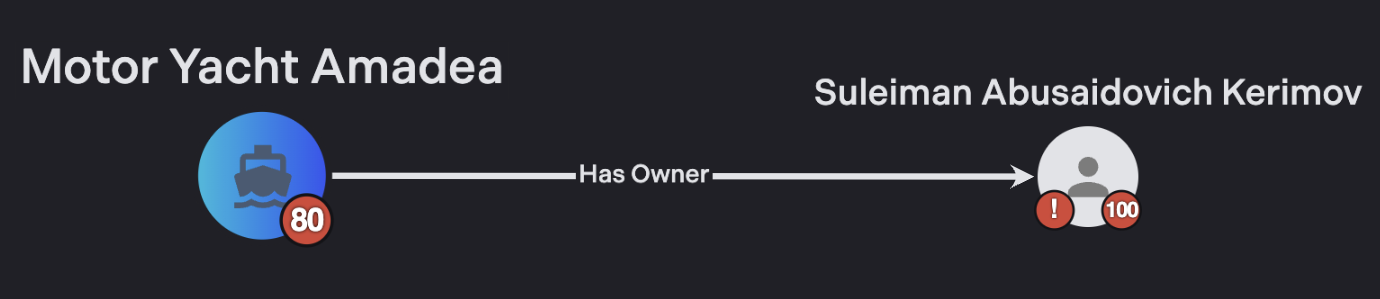
For example, if you were running a sanctions screen on a ship, the Motor Yacht Amadea, you would see no direct risks. It itself does not appear on any sanctions lists.
If your filterset has network risk enabled, when you perform the sanctions screen, you will see a sanctions indicator, but the indicator's hopsAway will be 1.
This is because the ship is owned by Suleiman Kerimov, and Kerimov himself is directly sanctioned by OFAC. The indicator states that one hop away in a network,
a sanctioned entity exists. Motor Yacht Amadea's sanction indicator will contain a field, causalSigmaID, that contains the full entity information for Suleiman Kerimov.
The Sigma360 platform shows this network risk differently than direct indicators:

News
News events describe adverse media that your entity has appeared in. Each object in the news array is a separate "event", one
topic that has appeared in the media over the course of a few days. These events can have many articles with similar information
from different publishers. When parsing an event, the eventLabel, eventSeverity, and eventMaterialityScore are most useful to display.
These are the fields available to you:
id- A unique identifier for this event
isPreferredPublisher- Whether the publisher is a well-known, reputable source, such as a government gazette or newspaper of record.
humanVerified- Most news articles are flagged by machine learning models. A small number are flagged by analysts.
eventSeverity- Whether keywords in the article suggest that the event was especially risky.
eventLabel- A human readable description of the event type, such as "Violent Crime" or "Financial Crime".
eventMaterialityScore- A rating from 0 to 1 of an event's relevance to an AML screening context. Higher scoring events should be shown first.
Each event can have a number of articles. Because the information is usually duplicative, it is recommended that you show only the first article in each event by default.
articles.[].title- Article Title
articles.[].url- User-accessible url of the article. May be paywalled or outdated.
articles.[].body- A small preview of the beginning of the article
articles.[].publisher- The name of the original publisher of the article
See a full JSON News example
"news": [
{
"id": "sigma_news_652c9d61041e455bacfc3dcb3efe293b51ffcc56_2022_38_financial_crime_grouped_738734399412",
"sigmaID": "DDY7GVVGDMHZ4",
"isPreferredPublisher": true,
"humanVerified": false,
"unformattedLabel": "financial_crime",
"eventSeverity": "high",
"eventLabel": "Financial Crime",
"eventMaterialityScore": 0.9480000138282776,
"articles": [
{
"articleHash": "c5c6f7f8cbf4896db21f6bdc45be1e7dc85265ba",
"title": "German Police Raid Residence of Russian Oligarch Alisher Usmanov; Tax Evasion and Money Laundering Suspected",
"url": "https://www.occrp.org/en/investigations/16781-german-police-raid-residence-of-russian-oligarch-alisher-usmanov-tax-evasion-and-money-laundering-suspected",
"body": "German police this morning launched a raid on properties belonging to sanctioned Russian oligarch Alisher Usmanov on the shore of Lake Tegernsee in southern Bavaria. Against a backdrop of clear Alpine water and towering green mountains, officers from multiple agencies bore down on several homes and",
"language": "en",
"publisher": "OCCRP",
"humanVerified": false,
"isPreferredPublisher": true,
"publisherCountryCode": "",
"publishedDate": "2022-09-21T00:00:00Z",
"extractedEntities": [
{
"text": "Gazprom",
"score": 0.9995070695877075,
"focalEntity": true,
"labels": [
"ORG"
],
"yearsOfBirth": []
}
],
"extractedTerritories": [
{
"count": 5,
"evidence": [
"Russia"
],
"adminOne": null,
"country": "RU"
}
],
"materialityScore": 0.9480000138282776
}
]
},
{
"id": "sigma_news_652c9d61041e455bacfc3dcb3efe293b51ffcc56_2024_29_regulatory_singleton_257698070271",
"sigmaID": "DDY7GVVGDMHZ4",
"isPreferredPublisher": false,
"articles": [
{
"articleHash": "25124d0e3502e7e1493f9080a6221c5c61ad3c72",
"title": "NEURC to investigate Moldovagaz's abuse of the wholesale energy market",
"url": "https://expro.com.ua/en/tidings/neurc-to-investigate-moldovagazs-abuse-of-the-wholesale-energy-market",
"body": "The investigation will start because of the GTS Operator of Ukraine LLC (GTSOU) reports. According to GTSOU, in April-June 2024, Moldovagaz carried out natural gas transportation operations by submitting nominations/renominations without registering it as a participant in the wholesale energy market",
"language": "en",
"publisher": "EXPRO Consulting",
"humanVerified": false,
"isPreferredPublisher": false,
"publisherCountryCode": "",
"publishedDate": "2024-07-16T08:34:38Z",
"extractedEntities": [
{
"text": "Gazprom",
"score": 0.9992969036102295,
"focalEntity": true,
"labels": [
"ORG"
],
"yearsOfBirth": []
}
],
"extractedTerritories": [],
"materialityScore": 0.4410000145435333
}
],
"humanVerified": false,
"unformattedLabel": "regulatory",
"eventSeverity": "",
"eventLabel": "Regulatory",
"eventMaterialityScore": 0.4410000145435333
}
]
KYC and Confirmatory Information
The KYC object provides information that can be used for entity resolution or analyst confirmation of a match. The KYC information should be used to validate that a
particular result is a match for your client. Note that another field, with type-specific KYC information, facet, may be included, but its format is not stable.
Fields available are:
aliases- Alternative names, DBAs, trade names, or AKAs for your result.
facts- Unstructured human readable key-value pairs of strings that are relevant to an analyst.
locations- A list of addresses, countries, and locations where the entity is known to reside, operate, or do business in. This may include locations as simple as a country, or as detailed as a full address, and everything in between, depending on the data source.
telephonesandwebsites- Contact information found for the entity.
See a full JSON KYC example
"KYC": {
	"aliases": [
		{
			"value": "Pjsc Gazprom",
			"sourceAttribution": [
				"1234_sourcenumber_nothumanreadable"
			]
		},
		{
			"value": "Gazprom",
			"sourceAttribution": [
				"1234_sourcenumber_nothumanreadable"
			]
		}
	],
	"facts": [
		{
			"label": "Description",
			"value": "The largest extractor of natural gas and one of the largest companies in the world, created in 1989 when the Ministry of Gas Industry of the Soviet Union transformed itself into a corporation, keeping all its assets intact.",
			"sourceAttribution": [
				"1234_sourcenumber_nothumanreadable"
			]
		}
	],
	"locations": [
		{
			"country": "Russian Federation",
			"countryCode": "RU",
			"majorAdministrativeDivision": "",
			"locality": "St. Petersburg, 197229,",
			"minorAdministrativeDivision": "",
			"streetName": "Lakhtinsky Avenue St.",
			"streetNumber": "2/3",
			"postalCode": "197229",
			"fromDate": "",
			"toDate": "",
			"address": "2/3 Lakhtinsky Avenue, St. Petersburg, 197229,",
			"type": "operating",
			"sourceAttribution": [
				"1234_sourcenumber_nothumanreadable"
			]
		}
	],
	"telephones": [
		{
			"value": "+7 495 719-30-01",
			"sourceAttribution": [
				"1234_sourcenumber_nothumanreadable"
			]
		},
	],
	"websites": [
		{
			"value": "www.gazprom.com",
			"sourceAttribution": [
				"1234_sourcenumber_nothumanreadable"
			]
		}
	]
}